Review activity
Who: Signed-in people with an Activity menu.
Activity helps you catch up on document events relevant to your account. It is organized as personal unread/read notifications rather than a document-approval checklist.
Review notifications
- Select Activity in the navigation.
- Open Unread to see items you have not cleared.
- Read the event details, including the client, document, actor, and time where shown.
- Follow an item's available link or action to inspect the related document.
Use the page controls for longer lists. Visibility depends on your account and client access; different people may have different feeds.
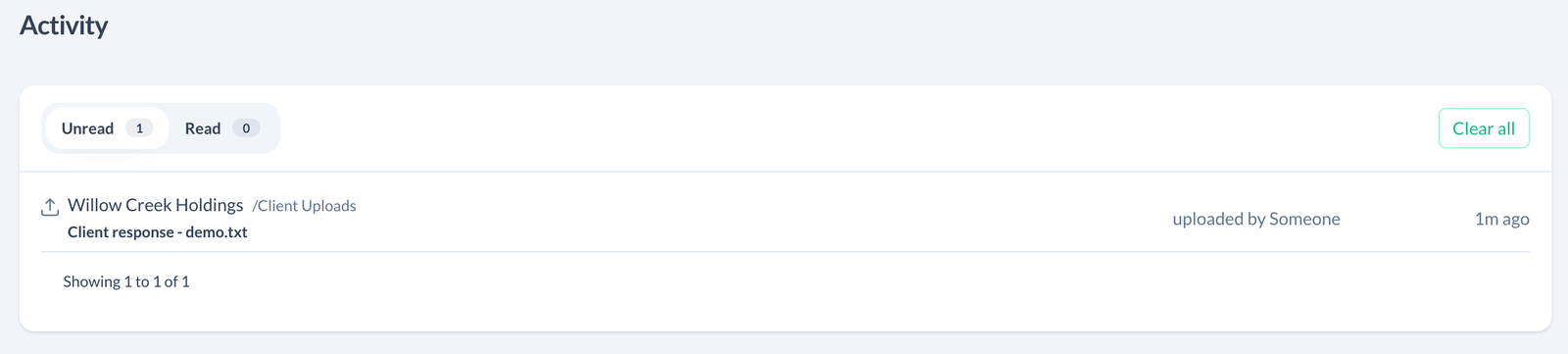
A secure-link upload may identify the uploader as Someone rather than a named account. The example above records the recipient upload shown in Send and receive documents.
Clear notifications
Use the individual item's clear action or Clear all to mark unread notifications as read. Open Read to review cleared items later.
Clearing notifications does not delete files, revoke access, or mark documents as formally approved. It changes your notification state.
If the feed is empty
Check both Unread and Read. An empty unread list can simply mean you have already cleared it. To confirm a requested upload, open the client's file list as well; the files themselves are the source of truth for what is currently in the workspace.
Email delivery is separate from your Activity read state. See Email notifications.